Git is often confused with the term GitHub because the two are used together so often. But Git is simply a version control system (VCS) software that resides on a user’s local machine. The back-end of Git tracks the history of changes (timing and content) to all the files you assign to be tracked using a specific method described below. The set of commands available to users through the Git API (application programming interface) is small relative to many other interfaces. But understandinng the usage of those commands is often one of the obstacles to learning Git. We have found that a visual approach to what Git is doing is valuable for gaining the intuition behind the standard workflows and API commands.
In the rest of this chapter, we will describe the three main types of version control systems and compare and contrast Git’s approach to the other two approaches. We will then provide a short summary of how Git evolved over its history into the form it currently takes. Some other good references for what Git is and its history are Pro Git Chacon & Straub (2020), sections 1.1, 1.2, and 1.3.
Version Control
Version control systems take three main forms: (i) local version control systems (LCVS), (ii) centralized version control systems (CVCS), and (iii) distributed version control systems. Wikipedia Contributors (2020) maintains an updated page, “List of version-control software,” that provides an exhaustive list of open source and proprietary version-control software packages categorized in each of these three types of approaches.
Local version control system
LVCS is one step more sophisticated than do-it-yourself approach. Conceptually, LVCS is saving the set of changes to the appropriate files in separate directories of the local machine. Using these changes or deltas, LVCS can recreate the state of the repository at the point of a given snapshot by sequentially executing those deltas to the initial state of the repository or undoing those deltas from the current state of the repository.
Figure 1 below shows an example of what an LVCS directory structure might look like. The repository being tracked is named “directory”. The figure shows five versions of the repository as files in five corresponding version folders. The files in the version1 folder represent the original or inital state of the repository. In the version2 folder, you can see that both file_A has changed to file_A1 and file_C has changed to file_C1. In folders version3, version4, and version5, more changes to the files are recorded.
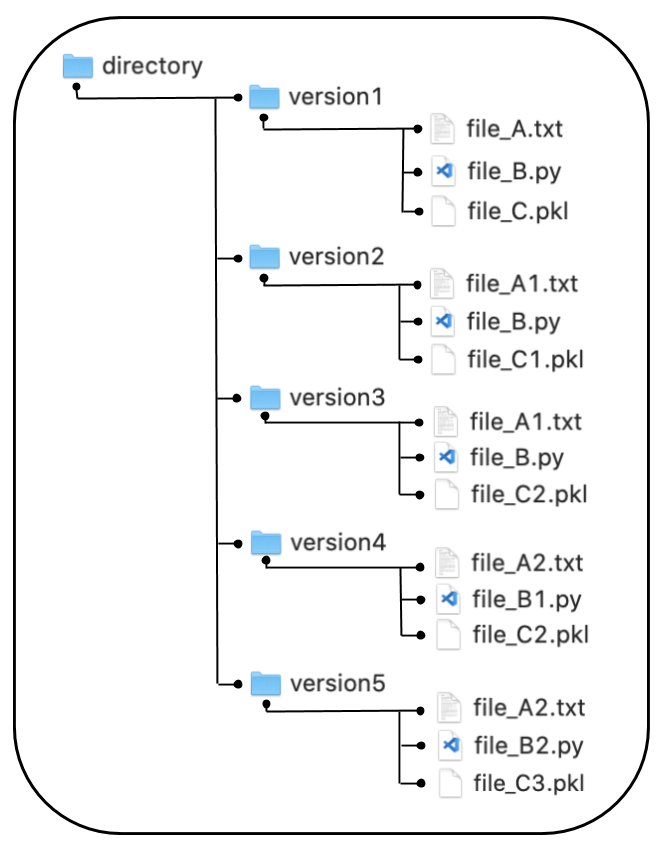
Figure 1:Example directory structure of local version control system (LVCS)
An LVCS will build the files in each version folder by storing only the changes to each file between contiguous versions. The LVCS approach has the benefit of containing the entire history of changes to a repository on your local machine. And because LVCS builds a version of the repository by storing only the changes or deltas in the files, the memory footprint of LVCS in minimized. However, LVCS has the disadvantage of not providing any good way of communicating and collaborating on the code being locally version controlled.
Centralized version control system
Figure 2 below shows the workflow of a centralized version control system (CVCS). Developers A and B check files out from the remote centralized server onto their respective local machines and make changes on their local machines. The central server version updates when changes from remote users are checked back in.
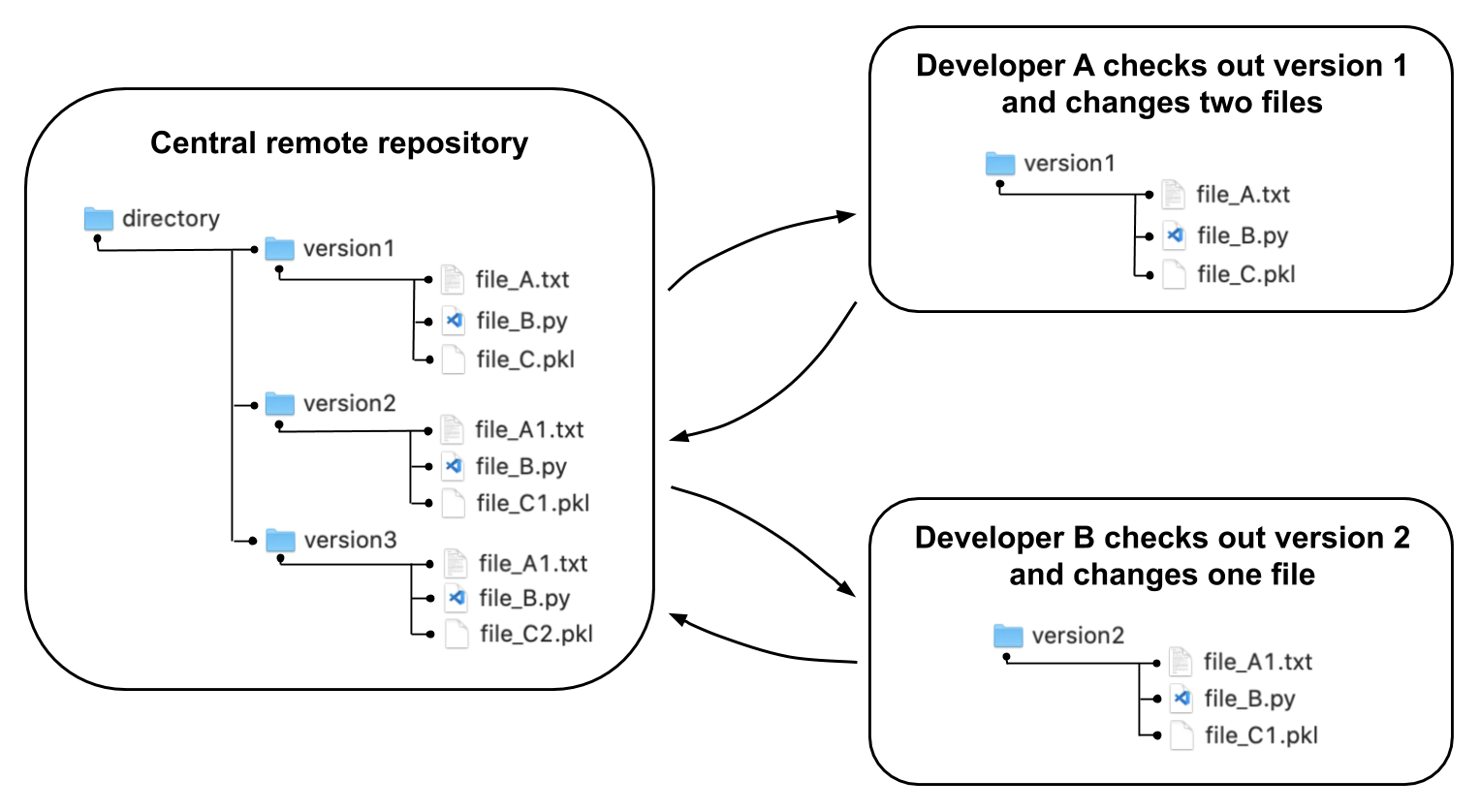
Figure 2:Example structure of centralized version control system (CVCS) workflow
The centralized version control system (CVCS) approach to version control allows for collaboration among a large number of developers and does not require a large memory footprint on each developer’s local machine. However, remote checking out and checking in is more time consuming, and the entire history of the repository is not on each developer’s local machine.
Chacon and Straub (2020, Section 1.1)Chacon & Straub (2020) highlights a potential drawback with CVCS that the central server exposes only one point of failure. However, with current standards for cloud services backup and security, this potential weakness is largely mitigated in most cases.
Distributed version control system
Git software is an open source version control system software with capability designed to also operate as distributed version control system (DVCS) software.
A distributed version control system (DVCS) puts the entire history on each user’s local machine upon some form of check out. The DVCS requires two components. The first component is software on all collaborating machines that tracks changes and communicates between the users’ machines. The second component is a cloud source code management service platform that coordinates collaboration among the participating users. In the case of this tutorial, the software is Git and the coordinating cloud platform is GitHub.
Figure 3 below shows how each of three collaborating entities in the DVCS collaboration has the full set of files and the full Git history residing on their local machine. Much of the difficulty in learning Git comes from the commands that allow these three (or many more) independent entities to effectively transfer, track, and communicate changes among each other. A definite downside to using a DVCS like Git is the complexity involved with updating, submitting changes, merging differences, and hierarchical permissions.
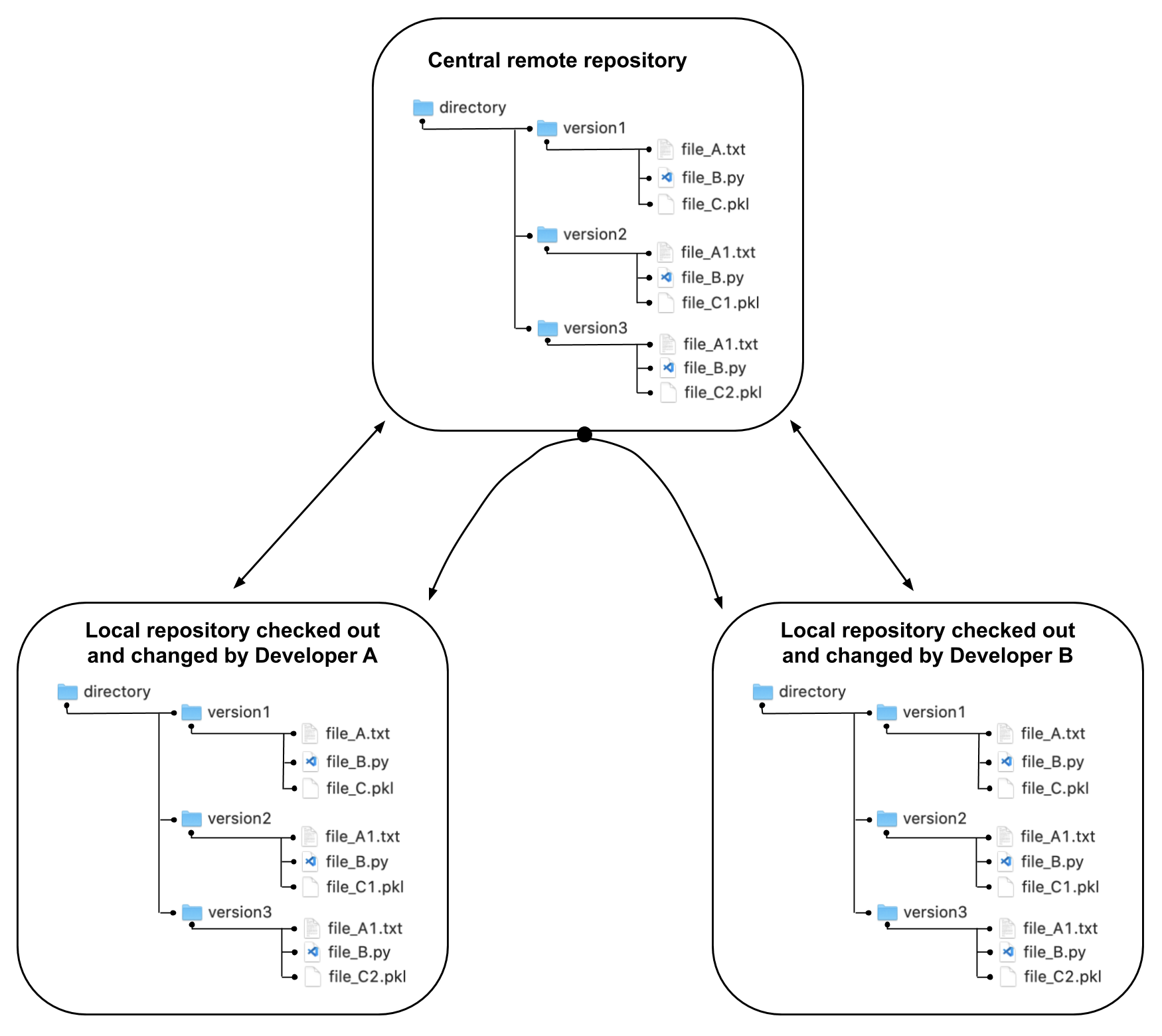
Figure 3:Example structure of distributed version control system (DVCS) workflow
On the positive side, the DVCS configuration is the most flexible and allows for many different workflows. It allows for a workflow that looks and behaves similarly to the CVCS workflow shown in Figure 2. But it also allows for collaborative workflows directly between users that is facilitated by the central server run by the source code management service platform.
Because the entire Git history and file structure resides on each user’s local drive independently, the project’s files naturally have many backups. And a user can work with the project files without being connected to the internet and at the speeds of their local machine. A related drawback to DVCS systems is that the memory footprint of the project is large.
Because the DVCS approach to version control is the most flexible and allows the most autonomy, it has become the most common version control method for open source projects, with Git version control software as the most widely used implementation.
History of Git: Why Git Became This
The standard Pro Git book Chacon & Straub (2020) has a chapter entitled, “A Short History of Git”. But a more recent article by Favell (2020) Favell (2020) entitled, “The History of Git: The Road to Domination in Software Version Control,” goes into more detail about Git’s rise from the early 2000s to the present. We also like Brown’s (2018) article Brown (2018), “A Git Origin Story.” But one also needs to know a little bit about the history of Linux, the open source operating system Wikipedia Contributors (2020), to appreciate its important role in the history of Git. The short history we present here is a synopsis that highlights why Git has the features and following that it does. We are trying to give you evidence that the investment required to learn Git is worthwhile.
Early in the Favell (2020) article Favell (2020), he gives the following strong evidence of Git’s current dominance in the VCS (version control system) field.
The best indication of Git’s market dominance is a survey of developers by Stack Overflow. This found that 88.4% of 74,298 respondents in 2018 used Git (up from 69.3% in 2015). The nearest competitors were Subversion, with 16.6% penetration (down from 36.9%); Team Foundation Version Control, with 11.3% (down from 12.2%); and Mercurial, with 3.7% (down from 7.9%). In fact, so dominant has Git become that the data scientists at Stack Overflow didn’t bother to ask the question in their 2019 survey. Favell (2020)
Early Linux development: 1991 to 2002
In 1991, Linus Torvalds posted an initial version of a free operating system on an internet message board used by developers. The developer community began to take interest in this operating system, and submitted patches and changes to the source code via internet until 2002. During this time period, the version control approach of the Linux kernel could be best described as a network of local version control systems (LVCS) early on, then transitioning to a centralized version control system (CVCS).
By the late 1990s, development of the Linux kernel as a viable operating system for broad use had greatly matured, and the number of developers and contributors had multiplied. The community of Linux developers were committed to keeping the kernel’s source code open source, but the scaling of the number of collaborators was being limited by the version control systems being used at the time, such as CVS and Subversion.
By 2000, some of the Linux developers were using a new source code management service and accompanying version control system, BitKeeper Wikipedia Contributors (2020), because it offered free code hosting. But the software for the BitKeeper VCS tools was proprietary, which made some of the core Linux developers uncomfortable given the Linux open source license and ethic. By 2002, Torvalds had prevailed on much of the community to host the main repository of the Linux source code with BitKeeper, which was a DVCS. The rationale was that the efficiencies from a mature DVCS platform would outweigh any conflict with proprietary versus open source licenses.
Linux development with BitKeeper: 2002 to 2005
Between 2002 and 2005 the main repository of the Linux kernel and many of its core developers were enjoying free hosting of DVCS (distributed version control system) collaboration and development through BitKeeper’s services. However, in 2005, a dispute between one of Linux’s developers and the CEO of BitKeeper’s parent company (who was also a Linux developer) resulted in BitKeeper revoking the Linux repository’s free status. Torvalds was torn between lack of alternative quality DVCS source code management services and the importance of not paying for the DVCS service and having the licenses associated with those services be consistent with and not restrictive of the Linux open source license.
It is worth noting the BitKeeper pioneered the distributed version control system approach. And it was not clear that any suitable alternatives could be found. A new DVCS system for Linux development had to be found. The Pro Git book cites five properties and a DVCS system had to have to satisfy the needs of the large and growing Linux development community.Chacon & Straub (2020)Wikipedia Contributors (2020)
Speed
Simple design
Strong support for non-linear development (thousands of parallel branches)
Fully distributed
Able to handle large projects like the Linux kernel efficiently (speed and data size)
Include very strong safeguards against corruption, either accidental or malicious
Birth and progress of Git: 2005 to present
It became clear that no suitable alternative to BitKeeper existed, so Torvalds began development of his own DVCS called “Git” on April 3, 2005.
The development of Git began on 3 April 2005. Torvalds announced the project on 6 April and became self-hosting the next day. The first merge of multiple branches took place on 18 April. Torvalds achieved his performance goals; on 29 April, the nascent Git was benchmarked recording patches to the Linux kernel tree at the rate of 6.7 patches per second. On 16 June, Git managed the kernel 2.6.12 release.Wikipedia Contributors (2020)
We could not find any definitive source of an instance in which Torvalds explicitly states where the name “Git” came from and what it means. But most sources point to the Git wiki FAQ thread, "Why the ‘Git’ name?"Git Wiki Contributors (2020) The most plausible origin of the name comes from a sarcastic quip by Torvalds that “Git” was named after the British slang for “pig headed or argumentative”. Torvalds is quoted as saying:
I’m an egotistical bastard, and I name all my projects after myself. First “Linux”, now “Git”. --Linus Torvalds Git Wiki Contributors (2020)
Figure 4 and Figure 5 below show the list of contributors, what they contributed, and when they contributed on the GitHub source code management service. Note that the Git source code has had 1,388 contributors over its history, and the Linux kernel has had 10,933 contributors--all using Git and GitHub to collaboratively create and improve their respective source codes. No other software and platform allow code collaboration to scale as effectively and efficiently.
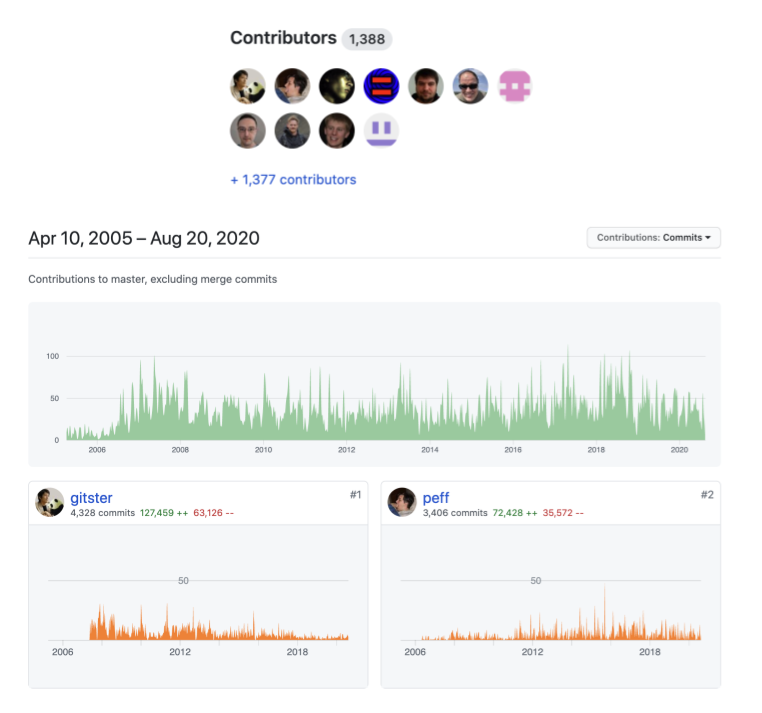
Figure 4:Screenshot of GitHub Git source code mirror contributors (https://
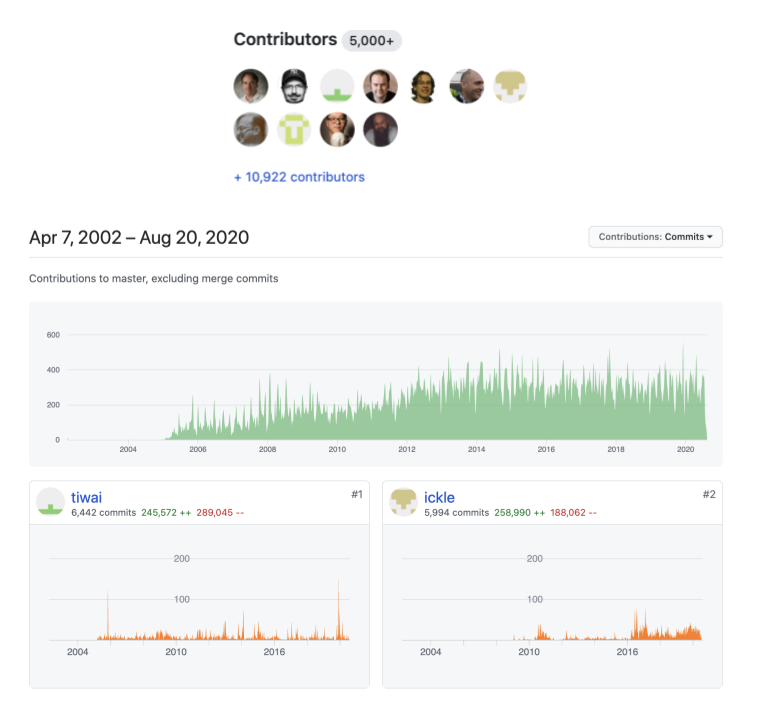
Figure 5:Screenshot of main Linux kernel contributors (https://
Git: Open to copy, selective to receive
We highlight two final characteristics of the Git version control system that are fundamental to its underlying philosophy and ethos--(i) ownership of code is completely decentralized and (ii) ownership of repository. First, Git is explicitly decentralized. We will define a fork more carefully in the chapter Git and GitHub basics and in the Glossary, but for now it is sufficient to say that a fork is a remote copy of a remote code repository (both of which reside in the cloud). Because Git is a distributed version control system (DVCS) each fork is a complete copy of the code repository along with its commit (or change) history. Anyone can fork a public repository and change the code however they like. Figure 6 below shows that the Git source code repository mirror on GitHub has more than 19,700 forks (see red oval highlight in upper-right corner). This means that 19,700 GitHub account users have made a complete fully functional copy of the Git source code and can make any changes they like to their personal forks.
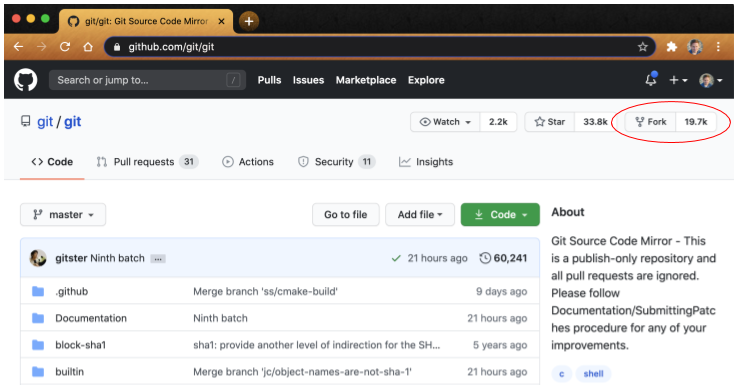
Figure 6:Screenshot of GitHub Git source code mirror main page (https://
The second characteristic seems to go in the opposite direction of the first point in that every code repository has a rigid hierarchical structure of who has permission to accept changes to the code to provide maximum code security and order while allowing the potential of contributions from anyone. In the open source community, the term benevolent dictator(s) is often attached to the individuals who have merge permission for a code repository or permission to accept changes into that repository. With the Git DVCS, anyone can make and take a copy of the public repository code and they can submit changes to anyone else’s repository. But only the individuals with merge permission for a given repository can accept and incorporate changes into the repository. We will discuss this more in Chapters Git and GitHub basics and Git and GitHub Collaborative Workflow.
These two characteristics together--open access to copy code repositories but restricted access to submit changes--has found the sweet spot for DVCS collaboration. This is why Git has gained such a large share of the version control system and source code management service market. Git, in combination with the GitHub source code management service platform, has proven to be the best way to efficiently scale collaboration on code development.
- Wikipedia Contributors. (2020). “Git.” Wikipedia, The Free Encyclopedia. https://en.wikipedia.org/wiki/Git
- Chacon, S., & Straub, B. (2020). Pro Git: Everything You Need to Know About Git (2nd edition). Apress.
- Wikipedia Contributors. (2020). “List of version-control software.” Wikipedia, The Free Encyclopedia. https://en.wikipedia.org/wiki/List_of_version-control_software
- Favell, A. (2020). “The History of Git: The Road to Domination in Software Version Control.” Welcome to the Jungle, Behind the Code, Coder Stories. https://www.welcometothejungle.com/en/articles/btc-history-git
- Brown, Z. (2018). “A Git Origin Story.” Linux Journal. https://www.linuxjournal.com/content/git-origin-story
- Wikipedia Contributors. (2020). “History of Linux.” Wikipedia, The Free Encyclopedia. https://en.wikipedia.org/wiki/History_of_Linux
- Wikipedia Contributors. (2020). “BitKeeper.” Wikipedia, The Free Encyclopedia. https://en.wikipedia.org/wiki/BitKeeper
- Git Wiki Contributors. (2020). “Git FAQ, Why the ‘Git’ name?” Git Wiki. https://git.wiki.kernel.org/index.php/GitFaq#Why_the_.27Git.27_name.3F